Building a RAG Chat Without LangChain (And What That Taught Me)
I built a RAG chat for my portfolio without LangChain and without a vector database. Here's what I thought RAG was before I started, what it actually is, and the things that surprised me along the way.
I had heard of RAG. I had not understood RAG.
Before I built this, if someone had asked me "what is RAG?", I would have said something like: "It's a way to teach an AI on content that's specific to your business, or that wasn't in the data the model was trained on."
That's a fine first sentence. It's also vague enough to be almost wrong.
I wasn't sure whether the model was being changed. Fine-tuned? Retrained? Quietly learning my blog posts in the background? I thought it "learned" the things I fed it, but I never had a precise picture of how. RAG was a black box that produced answers I trusted because the demo videos looked good.
So when I decided to add a chat to my portfolio that could answer questions about me, my projects, and my blog posts, I made a deliberate call: no LangChain, no vector database. I wrote every piece myself: the chunking, the cosine similarity, the retrieval, the prompt augmentation.
About 100 lines of code, total. And by the end of it, RAG had stopped being a black box.
I wanted visitors to ask real questions and get grounded answers. The only way I could trust what I was giving them was to understand every part of it.
What an embedding actually is (and what 1536 is not)
The first thing I had wrong was embeddings.
I knew they were "vectors for text." I did not know what that meant. When I looked at embeddings.json for the first time and saw a chunk of text sitting next to an array of 1536 floating-point numbers, I assumed those 1536 numbers were the characters or the tokens of the chunk.
They are not.
1536 is the number of dimensions in the vector. Every chunk, whether it's twenty words or five hundred words, comes back from OpenAI's text-embedding-3-small as the same shape: an array of exactly 1536 floats. The size is fixed by the model. Content length has nothing to do with it.
The fixed shape is what makes the whole thing work. You can only compare two vectors that live in the same space.
The intuition that made this click for me: imagine a space with 1536 axes. Every piece of text gets dropped onto a single point in that space. The direction of the point captures the meaning. Two chunks about the same topic land in similar directions, even if one is a sentence and the other is a paragraph.
That intuition is also what cosine similarity is measuring. Not distance. Angle.
// src/lib/rag.ts
export function cosineSimilarity(a: number[], b: number[]): number {
  let dot = 0,
    magA = 0,
    magB = 0;
  for (let i = 0; i < a.length; i++) {
    dot += a[i] * b[i];
    magA += a[i] * a[i];
    magB += b[i] * b[i];
  }
  return dot / (Math.sqrt(magA) * Math.sqrt(magB));
}
The formula is dot(a, b) / (|a| * |b|). The score is between 0 and 1. Same direction means the result is close to 1. Perpendicular means close to 0.
The formula still feels a bit weird, honestly. The idea clicked before the math did. It's the 2D case (two arrows on paper, the angle between them), scaled to 1536 dimensions. I think most developers are in the same place, and there's no shame in that.
The moment the magic died (in a good way)
After all the embedding work, all the cosine math, all the retrieval, here's where the chunks actually get handed to the model:
// src/app/api/chat/route.ts
const context = confidentResults
  .map((r) => `[${r.chunk.metadata.title}]\n${r.chunk.text}`)
  .join("\n\n---\n\n");

const system = `You are an assistant for Julian Schlickmann's portfolio...
Context:
${context}`;
That's the entire "augmented" half of Retrieval-Augmented Generation. It's .map().join(). The system prompt is literally Context:\n followed by the concatenated chunks.
This is the moment that demystified RAG for me. The model isn't learning anything. It never sees my blog posts at training time. At request time, it gets handed a prompt full of relevant paragraphs and writes a completion from those.
If you've heard of RAG and it still feels like magic, this is the line of code to stare at until it stops feeling that way.
The threshold story (or: top-K always returns K, even when K is garbage)
The first version of my retrieval did the obvious thing: embed the user's question, score every chunk against it, return the top 5, stuff them into the prompt.
It returned answers that were technically grounded and sometimes still wrong.
I noticed this when I asked the chat something about my background. The response correctly pulled my "About" section, which I expected. It also pulled an unrelated chunk from a blog post that had nothing to do with the question. The model dutifully wove the irrelevant chunk into its answer, and the result was a Frankenstein response that was 80% right and 20% confusing.
The problem: top-K always returns K results, even when K of them are not very good. For an out-of-corpus question, the top scores might be 0.18, 0.15, 0.12. Those weak chunks still end up in the prompt as if they were authoritative.
The fix is one filter:
// src/lib/rag.ts
export function filterConfidentResults(
  results: RetrievalResult[],
  threshold: number
): RetrievalResult[] {
  return results.filter((r) => r.score >= threshold);
}
I picked 0.25 by feel. I looked at the scores, found a number that filtered the obvious noise without killing borderline-useful chunks, and shipped. That's how most teams tune RAG, even if blog posts about it don't admit it.
I also caught a bug while writing this post: I had the filter applying to the source cards but not to what the model actually sees. The model was still getting the full unfiltered top-5. One variable name in the route file fixed it. If a threshold is meant to be a quality gate, it has to cover everything downstream, not just the UI.
On chunk size: 500 characters with 50 of overlap. The 500 was a feel-pick; I may have seen it in a tutorial somewhere. The overlap I actually thought about. Without it, a sentence that lands on a chunk boundary gets split, and neither half retrieves well for a question about that sentence. The overlap is cheap insurance.
Why no LangChain
LangChain would have given me less code. Less to maintain, faster to ship, cleaner overall.
But I don't understand things unless I build them. Writing each piece of the pipeline myself told me something a library would have hidden. I could rebuild the whole thing in another language tomorrow. That's the payoff.
If you're learning RAG, I'd say the same: do it raw once. Not forever, just once. After that, use whatever library your team prefers. The abstraction is fine once you know what it's abstracting. The problem with reaching for LangChain first is that the pipeline stays a black box, and your mental model stays where mine was before I started.
Source attribution is two features, not one
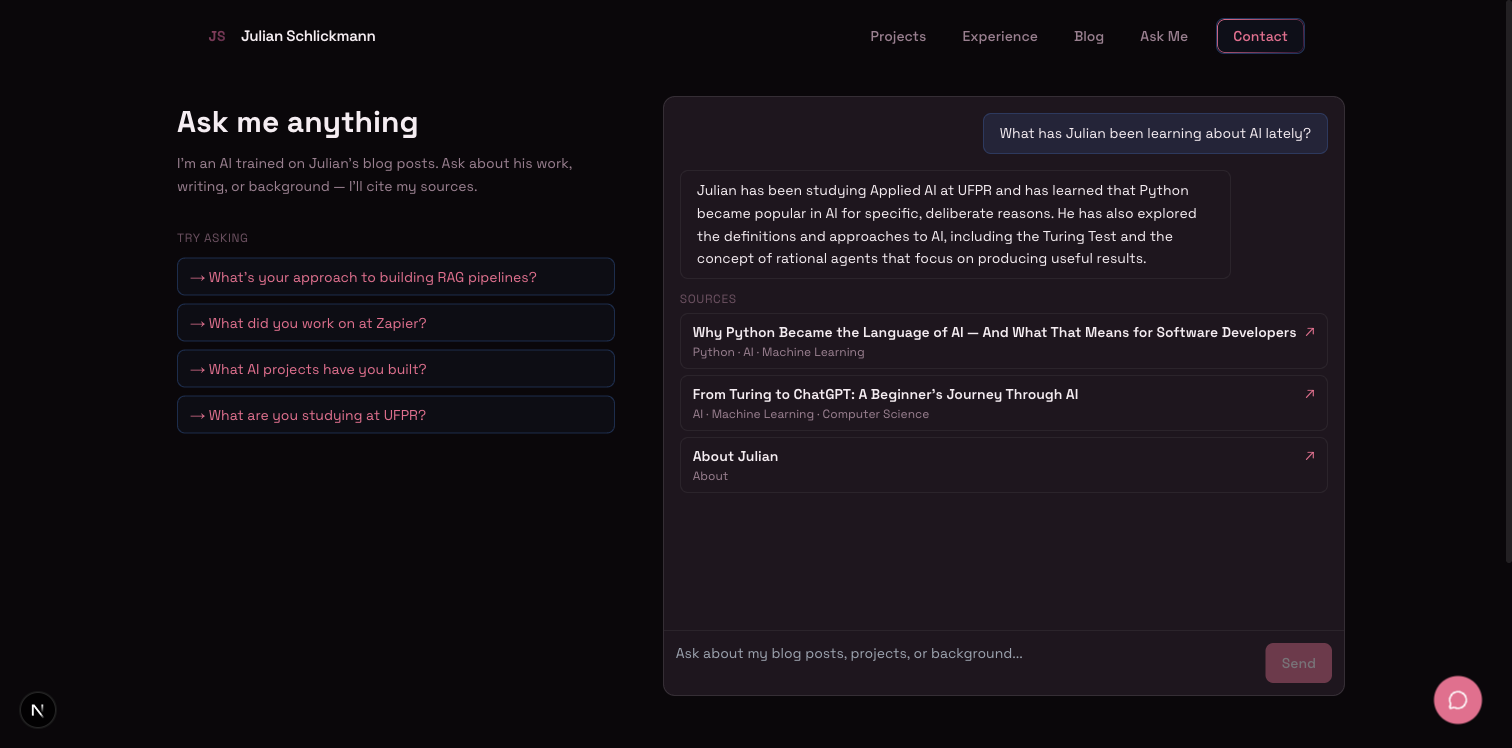
Every assistant message in the chat shows source cards below it. Citations point to specific blog posts or sections of my resume.
Most demo RAG bots don't bother. The usual argument for source cards is "users need to trust the answer." That's the first half.
The second half I rarely see written down: those source cards also let you see exactly what the retrieval is doing. Every time my chat returned a weird answer, the cards told me which chunk was responsible before I had to look at any logs. The threshold bug above was visible because the source cards showed it. They're a trust feature and an observability tool at the same time.
If you build a RAG, show the sources. When something breaks at an odd hour, you'll be glad you did.
What this doesn't do (and what's next)
The setup I shipped does not scale. My corpus is small: about six thousand words across five blog posts, some portfolio data, and my resume. It fits in src/data/embeddings.json and gets loaded into memory on every request.
That's fine at five posts. It's awkward at fifty. At five hundred, I would not want a multi-megabyte JSON file in my Git repository.
The next post will be the migration to a vector database, Supabase with pgvector. The chunking, the embedding call, and the API route all stay the same. Only the storage layer changes: a single retrieval call that goes from in-memory cosine similarity to a pgvector query using the <=> operator.
If you want to try the current version, the chat is live at /ask. Ask it something specific. If the answer feels off, the source cards will tell you why.
The model doesn't know who I am. It just gets handed the right paragraph at the right moment, and the rest is autocomplete. Build one by hand and you'll see exactly how that works. After that, the demos stop being impressive.